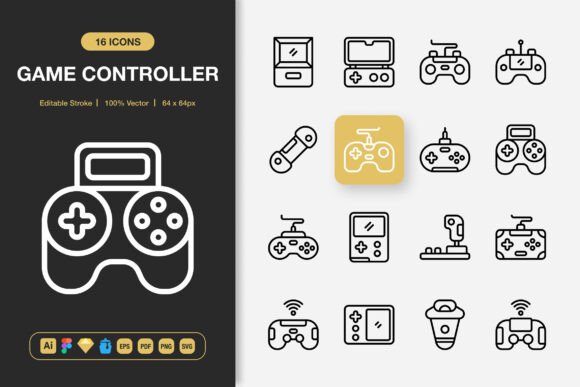
Elevate Your Projects with Game Controller Icons
Visual communication is essential in our digital world. Whether you're building a website, creating marketing materials, or designing an app, icons serve as a universal language that guides and engages users. For projects related to gaming, tech, or any interface needing intuitive controls, a dedicated set of symbols is invaluable. This is where a specialized collection like Game Controller Icons comes into play.
Game Controller Icons is a comprehensive set of high-quality, minimalist symbols representing the essential controls and functions found on modern gaming interfaces. Think of buttons like A, B, X, Y, directional pads, joysticks, triggers, and start or select buttons. But the utility extends beyond literal gaming applications. These icons represent concepts of input, direction, selection, action, and navigation, making them surprisingly versatile for many different projects.
The Core Appeal of a Minimalist Icon Set
The primary purpose of this icon set is to provide clear, instantly recognizable graphics that integrate seamlessly into any design. Their minimalist nature is their biggest strength. With clean lines and a focus on essential shapes, they avoid visual clutter and maintain readability at any size, from a tiny app button to a large poster graphic.
This design philosophy solves a common problem for creators: finding icons that are both stylish and functional. Overly detailed icons can look messy on small screens or distract from the main content. A minimalist set ensures your design remains polished and professional. The value lies in its adaptability. You aren't locked into a single stylistic theme; these icons can complement a wide range of layouts, from sleek corporate designs to more playful personal projects.
Who Benefits from Game Controller Icons?
You might wonder if this set is only for game developers. While it's perfect for gaming tutorials, app interfaces for streaming services, or esports event flyers, its appeal is much broader.
- Bloggers & Educators: Writing a tutorial about software shortcuts or a guide on navigating a complex platform? These icons can visually represent keyboard commands or interface actions, making your content easier to follow.
- Marketers & Small Business Owners: Creating an infographic about your product's features? Use a directional pad icon to symbolize "navigation" or an A button to represent "primary action." They add a modern, tech-savvy feel to brochures, banners, and social media posts.
- Freelancers & Hobbyists: Designing a personal portfolio website for tech-related work? Incorporating these icons in your UI/UX project section can demonstrate your understanding of user interaction in a visually clever way.
- App Developers: Even for non-gaming apps, symbols for play, pause, forward, and back are often needed. The familiar shapes from a game controller can serve as fresh, engaging alternatives to standard media icons.
The key is to think metaphorically. A joystick icon doesn't just mean "joystick"; it can symbolize "control," "movement," or "exploration." This opens up countless applications.
Practical Applications Across Media
Let's look at some concrete examples of where these icons can enhance your work.
For a mobile app focused on fitness coaching, use a trigger button icon to represent "start workout" and a directional pad to signify "navigate between exercises." On a website for a tech review blog, incorporate the X and Y buttons as part of a comparison table to denote "pros" and "cons." In print materials like a flyer for a coding workshop, the Start button icon could be a perfect visual for "beginner session."
The set's flexibility is further empowered by the included file formats. Having access to editable source files (like Adobe Illustrator and Figma) means you can tweak colors to match your brand palette or adjust stroke weights to fit your design's density. The multiple PNG sizes (from 32px to 512px) ensure you have the right resolution for web icons, presentation slides, or high-resolution posters without any loss in quality. The drag-and-drop convenience of Iconjar and Sketch files speeds up your workflow dramatically.
Essential Considerations Before Using Icon Sets
While a set like this is incredibly useful, a few thoughtful considerations will help you apply it most effectively.
First, assess the contextual fit. Even though the icons are versatile, ensure their "gaming" metaphor aligns with your project's tone. Using them in a formal financial report might confuse readers, whereas in a tech startup's investor pitch deck, they could convey innovation perfectly.
Second, leverage the customizability. Don't just use the icons as they come. The editable stroke feature is a powerful tool. Perhaps you need a thicker outline for better visibility on a busy background, or a softer color for a pastel-themed design. Making these small adjustments integrates the icons more deeply into your unique visual identity.
Finally, remember consistency. If you decide to use these icons for a specific function—like the A button always meaning "primary action"—maintain that rule throughout your entire project. Consistency in iconography improves user experience and professional polish.
Transforming Your Creative Process
Integrating a well-crafted, specialized icon set into your toolkit changes how you approach design problems. Instead of searching for disparate symbols or struggling with inconsistent styles, you have a cohesive visual library at your fingertips. The 100 icons in this Game Controller set provide a broad foundation, covering the core actions and directions you'll frequently need to illustrate.
This efficiency is a game-changer. It allows you to focus on the bigger creative picture—layout, messaging, user flow—while knowing you have reliable, high-quality visual elements ready to deploy. Whether you're a beginner just starting a blog or a professional designer working on a client's app, this resource saves time and elevates the final product. The included README file typically offers quick guidance, making the set accessible even if you're new to using vector files.
In essence, Game Controller Icons is more than just a collection of symbols for gaming. It's a versatile design asset built for clarity and adaptability, packaged with the practical file formats needed for real-world use across digital and print media. By thinking creatively about their application, you can add a layer of intuitive, modern visual communication to nearly any project you undertake.