Wizard Icons: A Modern Toolkit for Visual Communication
Iconography is one of the most powerful yet understated aspects of design. A well-chosen icon can convey a complex idea instantly, guide a user through an interface, or elevate a brand’s visual identity without a single word. For creators, the challenge often lies in finding an icon set that is versatile enough to adapt to myriad projects while maintaining a cohesive, high-quality aesthetic. This is precisely where the Wizard Icons set excels. It’s a comprehensive collection of 100 minimalist icons designed to be the visual foundation for virtually any creative endeavor.
What Makes Wizard Icons a Practical Choice?
At its core, Wizard Icons is a thoughtfully crafted library of symbols. Each icon is designed with a clean, minimalist philosophy, stripping away unnecessary detail to focus on clarity and immediate recognition. This simplicity is its greatest strength. Whether you’re designing a mobile app button or a poster for a local event, these icons communicate effectively without cluttering your layout.
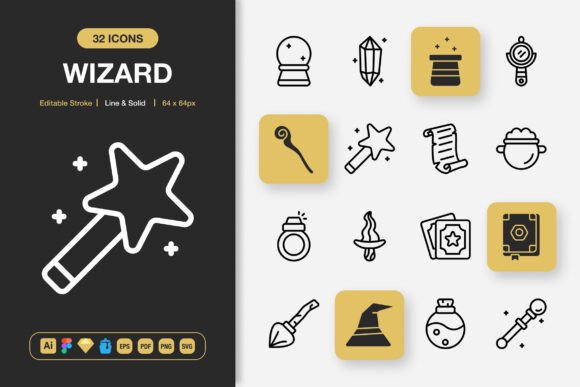
The set offers two distinct stylistic variations: Line and Solid. The Line style, with its editable stroke, provides a light, modern feel ideal for digital interfaces and contemporary branding. The Solid style offers a more substantial, filled-in look that commands attention, perfect for print materials or areas requiring stronger visual weight. Having both styles within the same family ensures your projects maintain visual consistency even when you mix and match.
The Universal Appeal of a Minimalist Icon Set
Why might someone choose Wizard Icons over other available sets? The answer lies in its balance of quality and flexibility. For a beginner blogger, the drag-and-drop ease of the included PNG files means they can quickly enhance a website sidebar or social media graphic without learning complex software. For a professional UX designer, the availability of source files like Figma, Sketch, and Adobe Illustrator allows for deep customization, integration into design systems, and scaling to any size without loss of quality.
Consider the common hurdles creators face: hunting for icons across disparate, inconsistent sets; dealing with pixelated graphics when scaling; or struggling to edit an icon’s color to match a brand palette. Wizard Icons directly addresses these problems. The provided files—from scalable SVG and EPS vectors to ready-to-use PNGs in seven specific sizes (from 32px to 512px)—eliminate technical guesswork. The high quality ensures icons look sharp on any screen or printed medium, while their minimalist design makes them inherently suitable for any context, from a sleek tech startup’s app to a community educator’s infographic.
From Digital Screens to Printed Materials
The application possibilities for Wizard Icons are genuinely broad. In digital spaces, they can serve as intuitive navigation elements on a website, clear action indicators in a mobile app, or engaging visual accents in social media posts and email campaigns. Their clarity is key for user experience, helping guide interactions without explanatory text.
In physical and print domains, their utility shines equally. The high-resolution files ensure they print crisply on flyers, banners, posters, and even within books or manuals. An entrepreneur might use them to create a clean, professional-looking flyer for a service launch. A marketer could incorporate them into an infographic to make data more accessible. A hobbyist crafting a personal project, like a custom wedding website or a community newsletter, benefits from the professional look they provide without requiring professional design skills.
Key Features That Support Real-World Use
Beyond the aesthetic, the practical features included with Wizard Ions form a robust toolkit. The 100 customizable icons cover a wide range of universal concepts—from common actions like search and download to objects, symbols, and basic communications. This breadth supports most standard project needs without requiring supplemental icon searches.
The inclusion of multiple source and application files is a significant value point. Having the original Adobe Illustrator file gives vector-based designers full control. The Figma and Sketch files cater directly to the workflows of modern UI/UX designers. The IconJar file offers a convenient way to organize and access the library within a design environment. For broader compatibility, the EPS 10 and PDF files are reliable standards for print and publishing workflows.
Perhaps most user-friendly are the ready-to-use SVG and PNG files. The SVG format, scalable and web-friendly, can be styled with CSS for developers. The PNGs, provided with transparency at multiple specific pixel dimensions, are instantly usable for anyone who needs to place an icon into a project without any editing. The accompanying Readme.txt file provides straightforward guidance, ensuring users can quickly understand and access the assets.
Integrating Wizard Icons into Your Creative Process
Using Wizard Icons is designed to be straightforward. For a quick implementation, you can drag and drop a PNG of the required size directly into your website builder, presentation software, or basic graphic editor. For a more customized approach, you can open the vector file in your preferred design program to change colors, adjust stroke widths in the Line style, or combine icons to create new compound symbols. This adaptability makes the set a long-term asset, as your skills or project requirements grow, the icons can grow with you.
Before committing to any icon set, it’s wise to consider your primary medium and skill level. Wizard Ions is exceptionally well-suited for projects that demand a clean, modern visual language across both digital and print. If your work leans heavily towards very detailed, illustrative, or highly thematic graphics, this minimalist set might serve as a complementary base rather than a complete solution. However, for the vast majority of communication needs—where clarity, speed, and consistency are paramount—its design and file offerings provide a remarkably solid foundation.
A Foundational Resource for Diverse Creators
Ultimately, Wizard Ions represents more than just 100 icons; it’s a reliable resource for visual communication. Its value lies in reducing the friction typically associated with finding and implementing quality graphics. For the freelancer juggling multiple client projects with different brand styles, the editable nature saves precious time. For the small business owner building their own presence, it offers a professional visual toolkit without a recurring subscription cost. For the educator or hobbyist, it demystifies the process of adding effective graphics to their work.
By focusing on minimalist design, high-quality production, and delivering files for every major platform and use case, Wizard Ions empowers a wide audience. It supports the goal of making projects look polished and cohesive, solves the problem of fragmented, low-quality asset hunting, and meets the need for a scalable, adaptable visual library. Whether your next project is a website, an app screen, a printed banner, or a social media campaign, having a consistent set of clear, well-crafted icons like Wizard Ions can indeed change the outcome, lending it a sense of intentional, professional design.