Telescope Icons: A Balanced Evaluation of a Comprehensive Icon Set
In the world of digital design, the choice of an icon set can significantly influence the clarity, professionalism, and aesthetic cohesion of a project. Among the many options available, Telescope Icons presents itself as a versatile and feature-rich collection. This article provides a practical evaluation of this set, examining its characteristics, potential fit for various projects, and the tradeoffs one might consider when comparing it to other available resources.
Understanding the Scope of Telescope Icons
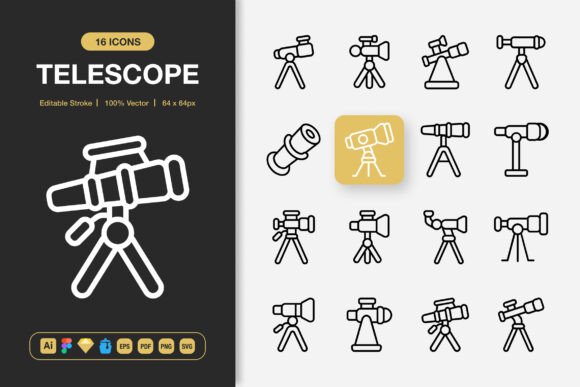
Telescope Icons is marketed as a set of high-quality icons suitable for any project, aiming to change one's approach with a minimalist design philosophy. The core promise is breadth of application: the icons are intended for websites, mobile apps, printed materials like books and flyers, social media graphics, infographics, and large-scale formats like banners and posters. This universal suitability claim is a key starting point for evaluation.
What distinguishes Telescope Icons, upon closer inspection, is not just the minimalist style but the comprehensive package of features and file formats. The set includes 100 icons, each described as customizable. A critical feature highlighted is the "Editable Stroke," which suggests designers can modify line weights and details directly within vector files. This level of control is often a deciding factor for professionals needing to tailor assets to specific brand guidelines or visual systems.
Evaluating the Practical Value of Included Formats and Files
The delivered package is notably extensive. For a designer or team comparing asset libraries, the inclusion of source files for multiple major platforms is a significant practical benefit. Telescope Icons provides the original Adobe Illustrator file, a Figma file, a Sketch file, and an Iconjar file. This multi-tool support reduces the friction of integration, whether a team uses a single preferred application or operates across a mixed software environment.
Furthermore, the export formats cover nearly every common need. The EPS Version 10 and SVG files are crucial for scalable print and web work, respectively. The inclusion of PNG files at a range of specific sizes—from 32px to 512px—saves time on manual rasterization for common digital interface requirements. The PDF can aid in quick review or certain print workflows, and a Readme.txt file presumably offers usage instructions. This completeness suggests the set is designed for efficiency, aiming to deliver a "ready-to-use" toolkit rather than a basic collection that requires significant post-processing.
Comparing the Minimalist Design Approach to Alternatives
Minimalist icon design, as championed by Telescope Icons, sits within a broader spectrum of visual styles. When evaluating alternatives, designers typically consider detailed skeuomorphic icons, highly stylized illustrative sets, or branded packs with a very specific character. The minimalist approach offers strengths in clarity and adaptability. Its simplicity means it can integrate into diverse projects without clashing with existing complex visuals, and it often aligns well with modern, clean interface trends.
However, this is also a potential tradeoff. For a project requiring warmth, intricate detail, or a very playful personality, a strictly minimalist set like Telescope Icons might feel too sterile or generic. It excels in functional communication and broad compatibility but may lack the unique artistic voice that some bespoke or themed icon sets provide. Therefore, when comparing options, the decision hinges on whether the priority is versatile utility or strong, distinctive stylistic expression.
The "Editable" and "Customizable" Claim: A Key Decision Factor
Many icon sets are offered as static PNGs or locked SVGs. The ability to customize, especially at the vector stroke level, elevates a set from a fixed asset to a flexible design component. This feature of Telescope Icons allows for adjustment of scale, color, line thickness, and potentially even compositional elements without degrading quality. For agencies or in-house teams that need to modify icons to fit exact color palettes or align with specific design system rules, this editable nature is a major advantage over static alternatives.
It's worth noting, however, that true customization requires proficiency with the provided software (Illustrator, Figma, Sketch). For a user who only needs to drag and drop pre-made PNGs, the value of the source files is diminished. The "Easy Drag and Drop" promise is supported by the pre-sized PNGs, but the full potential of Telescope Icons is unlocked only with vector software skills.
Identifying the Best-Fit Situations for Telescope Icons
Given its characteristics, Telescope Icons appears to be an optimal choice in several realistic scenarios. For a startup or small business building its first website and app concurrently, a single cohesive set that works across both media is efficient. For a freelance designer serving clients with varied industries, a versatile, minimalist set can be a safe, adaptable base to start from. In educational or informational projects like infographics and posters, where clarity of message is paramount, the clean lines of such icons can enhance comprehension.
The package's breadth also makes it suitable for cross-functional teams. A marketing professional might use the PNGs for social media graphics, while a product developer uses the SVGs for an app interface, both drawing from the same asset library. This can streamline project coordination and maintain visual consistency.
Recognizing Limitations and When to Seek Other Options
No resource is universally perfect, and an informed decision requires acknowledging limitations. While Telescope Icons offers 100 icons, some projects may require a more extensive library with niche symbols (e.g., specific industry-related icons for healthcare, finance, or obscure technology). In such cases, a larger set or a more specialized collection might be necessary.
Additionally, if a project's entire aesthetic is built around a non-minimalist style—such as a vintage, hand-drawn, or highly decorated theme—the core design philosophy of Telescope Icons may not align, even with customization. The editable strokes allow for some adjustment, but transforming a minimalist icon into a richly detailed one is often impractical. Here, sourcing an icon set that originates from the desired style would be a more effective path.
Finally, for individuals or teams operating exclusively on software not supported by the source files (like Affinity Designer or certain open-source tools), the value of the Illustrator, Figma, and Sketch files is lost. They would rely on the generic SVG, EPS, and PNGs, which is still functional, but they might find comparable sets offered with native files for their preferred platform.
Making an Informed Choice: Balancing Needs and Resources
Selecting an icon set is a balance between project requirements, team capabilities, and long-term resource value. Telescope Icons positions itself as a high-quality, all-in-one solution. Its strengths lie in its multi-format delivery, minimalist versatility, and customization potential. It is a strong contender for projects requiring a clean, modern look across multiple mediums and for teams that can utilize the vector source files to tailor the assets.
When comparing it to the wider market, consider your need for stylistic uniqueness, the required icon quantity and specificity, and the design software your team uses. For broad-application projects where efficiency and consistency across web, print, and digital platforms are key, Telescope Icons offers a compelling, practical package. For projects demanding a very strong, pre-defined artistic flair or an enormous library of thousands of icons, exploring alternatives and specialized sets would be a prudent part of the research process. Ultimately, evaluating such a product involves aligning its tangible offerings—the file formats, the design style, the editable features—with the tangible needs of your specific design workflow and project goals.